Send Airtime& Data Globally
Pay with Cards or Stablecoins
Instant, like a text!
Top up phones in Ethiopia, Kenya, Ghana and Nigeria in a few taps, with Visa, Mastercard, American Express, USDC or PYUSD.
Available to customers in the United States.
Pay with Visa, Mastercard, American Express, USDC or PYUSD. SmilePay delivers airtime and data to phones in Ethiopia, Kenya, Ghana and Nigeria.






Data delivered
Ethiopia
 Ethiopia
What you can do
One app to look after family back home.
Start with what family asks for most: airtime and data. More ways to help are on the way.
Airtime, data and voice
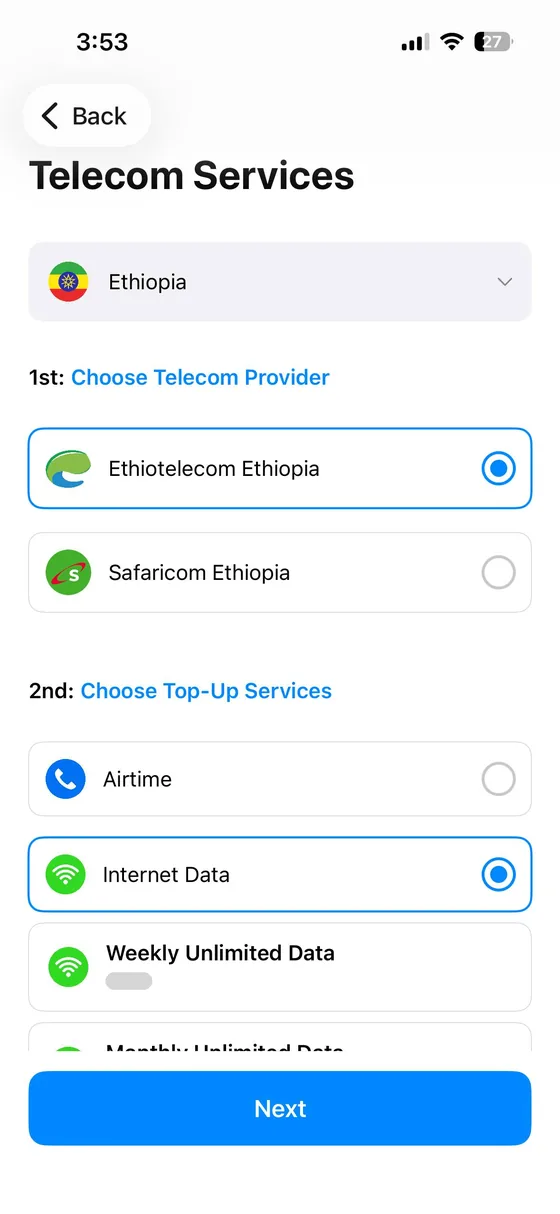
Top up a phone in Ethiopia, Kenya, Ghana or Nigeria. The package lands straight on their phone, and they don’t need the app.
Ethiopia
Kenya
Ghana
Nigeria


Pay with digital dollars
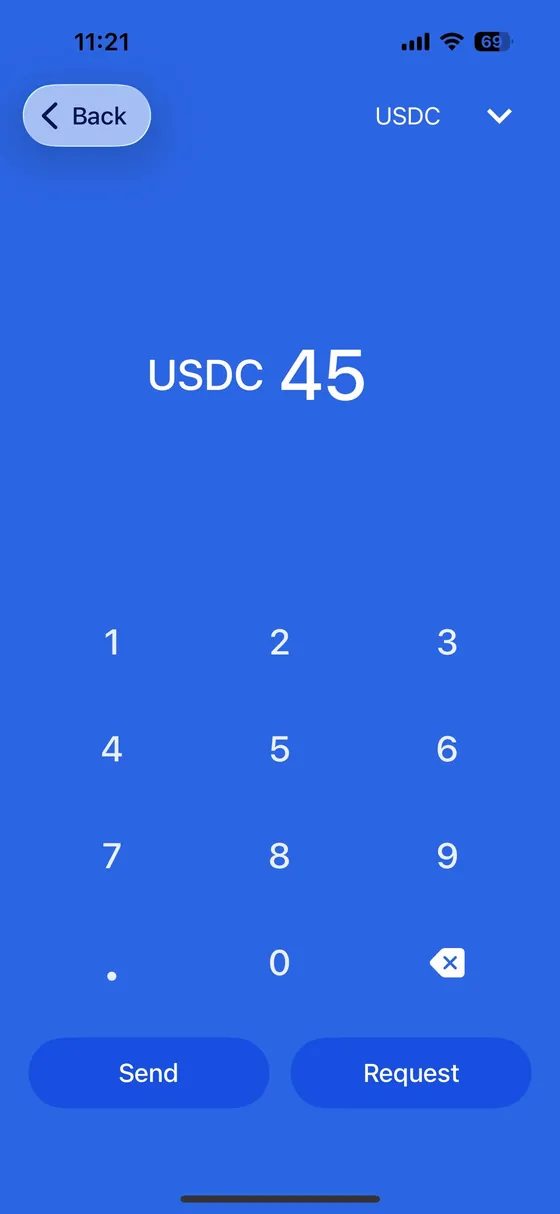
Use USDC or PYUSD to buy telecom bundles for someone back home.
Pay with your card
Use Visa, Mastercard or American Express to buy telecom bundles.
Send money to Ethiopia
From your phone straight to any bank in Ethiopia.
More ways to help
- A US account in your name
- Virtual card
- Swap digital dollars
- Water and electricity bills
- School fees
How it works
Three steps. All in the app.
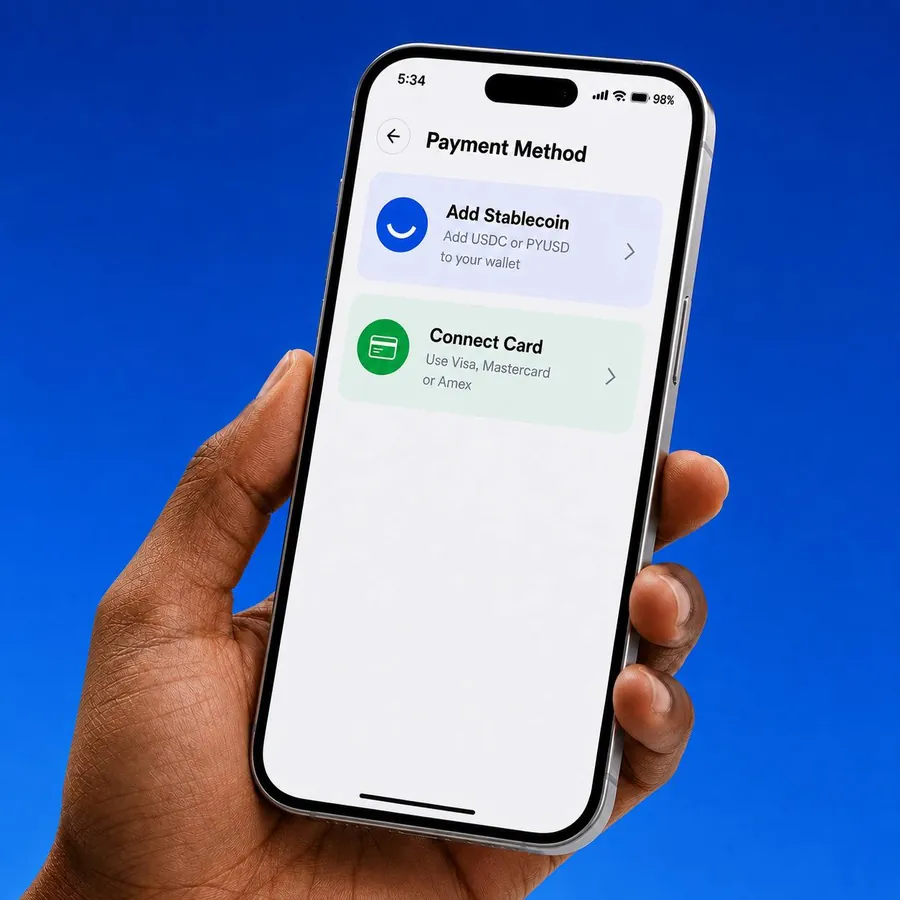
Step 01
Connect Your Card or Add Stablecoins
Connect your Visa, Mastercard or American Express card, or add USDC or PYUSD to your SmilePay balance.
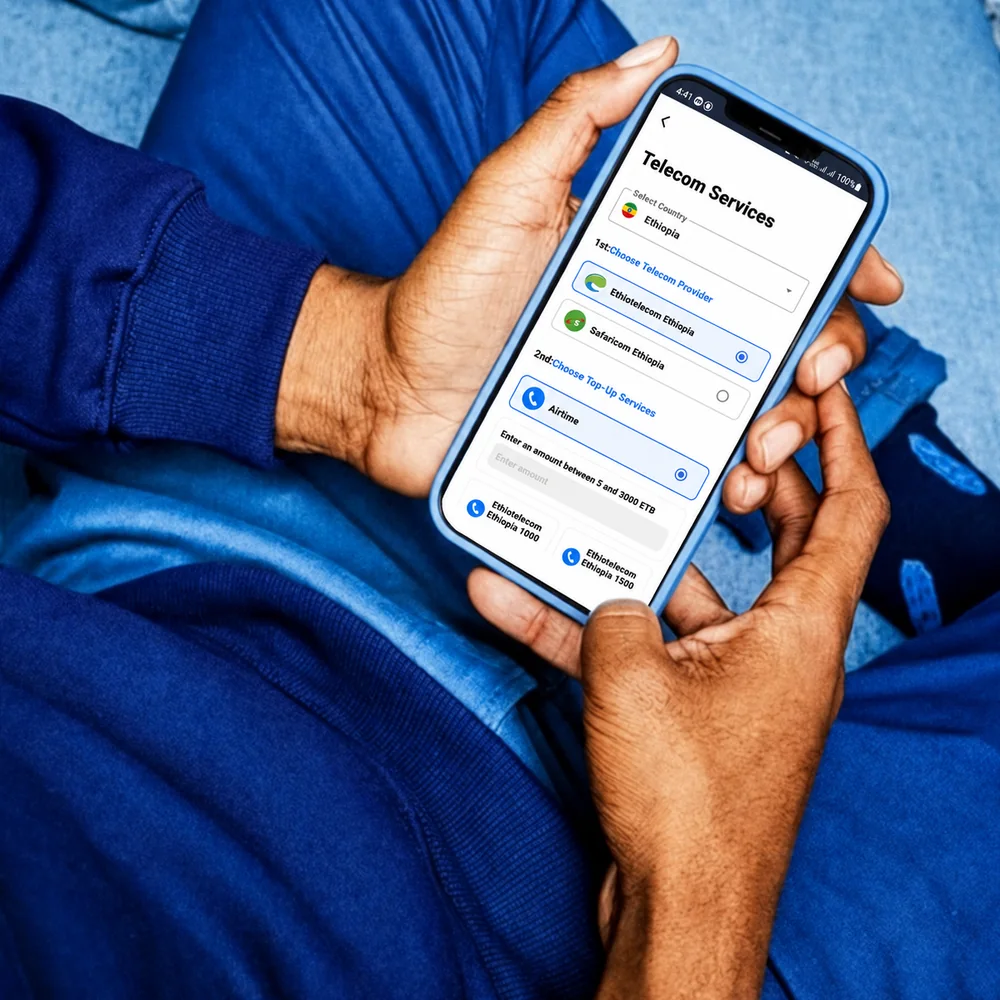
Step 02
Choose a Package
Select the recipient's country and mobile provider, enter their number and choose an airtime, data, voice or SMS package.
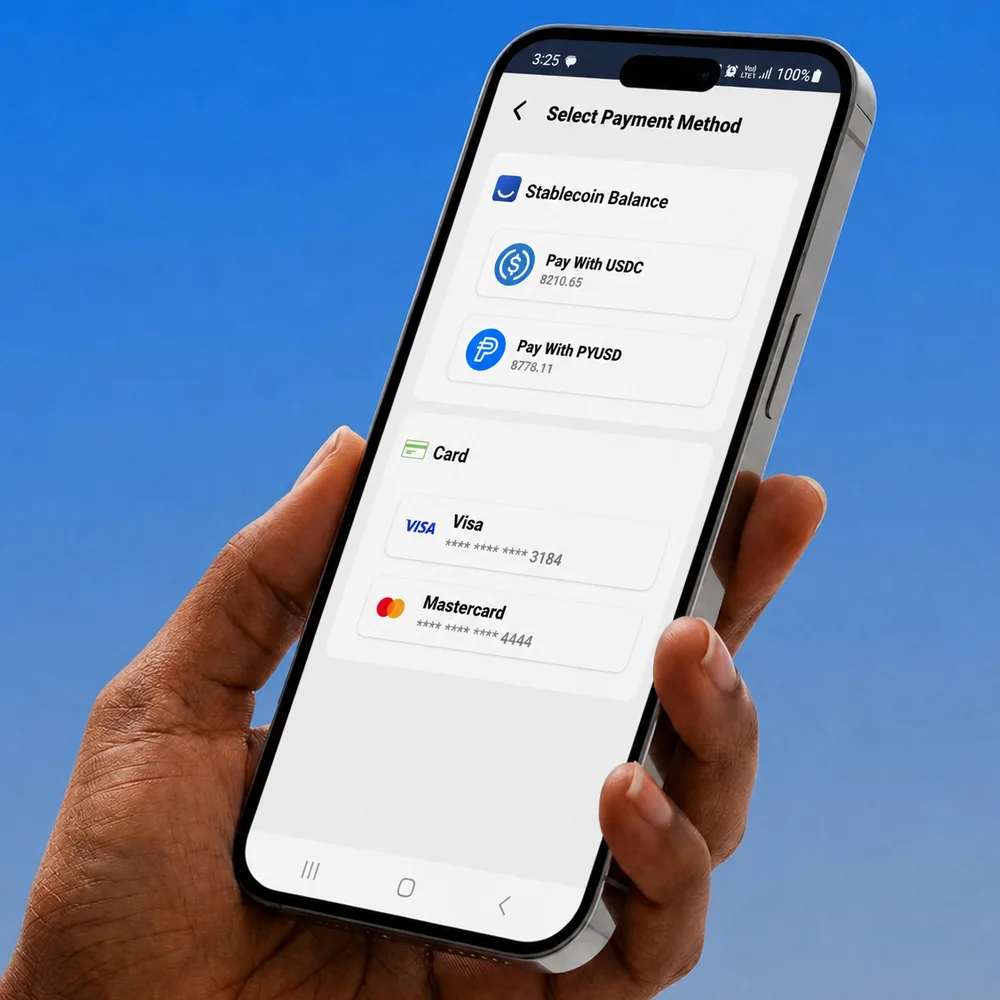
Step 03
Pay and Send Instantly
Pay with Visa, Mastercard or American Express, or use your USDC or PYUSD balance. The package is delivered straight to their phone.
Note: Cards can only be used to buy telecom services.
Try it
Top up their phone from yours.
Pick a country, choose a package and enter their number. The package lands on their phone as soon as you pay.
- No app needed on their side
- Pay by card, USDC or PYUSD
- Every top-up in your history
This is a preview. Nothing is charged. Telecom bundles and prices are shown in the app.
Stablecoins, explained
What’s a stablecoin?
A digital dollar you can send anywhere. Five things worth knowing.

1 USDC = $1.00
One stablecoin, like USDC or PYUSD, is designed to always be worth one US dollar. You can hold it, send it and spend it like money, from your phone.
In SmilePay: pay for airtime and data with USDC or PYUSD today. More ways to use them are coming soon.
Built on Stellar
Stellar at the core. Every rail around it.
SmilePay is built natively on the Stellar network. Money can come in from cards, banks, PayPal, Venmo and other blockchains, settle on Stellar and go out to phones, bank accounts and bills.
Money in
Visa, Mastercard, Amex
Cards
USDC
On Stellar
PYUSD
PayPal and Venmo
US bank (ACH)
Adds USDC with fiat USDSoon
USDC
From other blockchainsSoon
USDT
You receive USDC or USDT0Soon
SmilePay
Settles on Stellar
Money out
Airtime and data
4 countries
Ethiopian banks
Any bankSoon
Your US bank
Cash outSoon
Water & electricity bills
Plus school fees, back homeSoon
Latin America
New regionSoon
It’s instant, like a text.
Top up a phone back home from the bus, the office or the airport.
FAQ
Questions, answered.
General questions
What is SmilePay?
SmilePay is a digital telecom payments platform that enables diaspora communities in the USA to buy airtime, data, voice and SMS packages for loved ones abroad. Customers can pay directly using Visa, Mastercard or American Express, or use supported stablecoins such as USDC and PYUSD.
What can I use SmilePay for right now?
You can use SmilePay to buy airtime, data, voice and SMS packages for loved ones in Ethiopia, Kenya, Ghana and Nigeria. Pay directly with Visa, Mastercard or American Express, or use your USDC or PYUSD balance. More countries, mobile operators and services are coming soon.
Which countries is SmilePay starting with?
SmilePay is starting with diaspora communities in the USA buying airtime and mobile packages for loved ones in Ethiopia, Kenya, Ghana and Nigeria. More countries will be added soon.
Can users in Ethiopia, Kenya, Ghana and Nigeria use SmilePay?
Not yet. SmilePay will soon be available to users in Ethiopia, Kenya, Ghana and Nigeria. Once it launches, users will be able to download SmilePay, add supported stablecoins such as USDC or PYUSD to their balance, and use them to buy airtime, data, voice and SMS packages. Card payments are currently intended for users in the USA. More details will be announced as services become available.
Can users in the USA use SmilePay?
Yes. Users in the USA can download SmilePay and buy airtime, data, voice and SMS packages for loved ones in Ethiopia, Kenya, Ghana and Nigeria. They can pay directly using Visa, Mastercard or American Express, or use USDC or PYUSD from their SmilePay balance.
What services will SmilePay add in the future?
SmilePay plans to expand into utility payments and other essential cross-border services. Broader licensed financial services may also be added in the future, subject to regulatory approval.
Airtime, data, voice & SMS payments
How do I send airtime, data, voice or SMS?
Open the SmilePay app, select the recipient's country, choose their mobile provider, enter their phone number, and select an airtime, data, voice or SMS package. Pay securely with Visa, Mastercard or American Express, or use your USDC or PYUSD balance. The package is delivered directly to the recipient's phone, usually instantly or within a few minutes.
What if the recipient does not receive the package?
If your payment was completed but the recipient did not receive the package, go to the 'History' tab in the app and retrieve the transaction ID. Then contact SmilePay customer support with the transaction ID so the support team can review and assist you.
Can I cancel a telecom payment after sending it?
Once a telecom payment has been processed, it usually cannot be cancelled, refunded or reversed. Please make sure the recipient's phone number, operator, package and amount are correct before confirming the payment.
Can the recipient convert airtime or data into cash?
No. SmilePay's telecom product is designed for airtime, data, voice and SMS payments. It is not a cash transfer service.
Stablecoins & network
Which stablecoins does SmilePay support?
SmilePay supports USDC and PYUSD on the Stellar network.
What network should I use when sending stablecoins to SmilePay?
Users should send supported stablecoins to SmilePay only through the Stellar network. Sending funds through an unsupported or incorrect network may result in loss of funds.
What is a stablecoin?
A stablecoin is a type of digital currency designed to stay close to the value of a traditional currency, usually the US dollar. SmilePay uses stablecoins to make cross-border telecom payments faster and more practical.
Why does SmilePay use stablecoins?
SmilePay uses stablecoins because they can support faster, more flexible and more efficient cross-border payments. SmilePay's goal is to make stablecoins useful for real-life support, starting with airtime, data, voice and SMS packages.
Do I need to understand crypto to use SmilePay?
No. SmilePay is designed to make stablecoin payments simple. The app guides users through the payment process so they can support loved ones without needing advanced crypto knowledge.
Can I use my card to pay for telecom packages?
Yes. You can pay directly using Visa, Mastercard or American Express when purchasing airtime, data, voice or SMS packages. However, cards cannot be used to top up your USDC or PYUSD balance.
Adding money to SmilePay
How do I add money to SmilePay?
Users can add supported stablecoins to their SmilePay wallet. SmilePay currently supports USDC and PYUSD on the Stellar network. The app will provide the wallet address and instructions for adding funds.
Can I add PYUSD from Venmo?
Yes, where supported. Venmo users in the USA can buy, hold, send and receive PYUSD. Users may be able to send PYUSD from Venmo to their SmilePay wallet, as long as the transfer uses the correct supported network and SmilePay wallet address.
Can I add PYUSD from PayPal?
Yes, where supported. Eligible PayPal users may be able to buy, hold, send and receive PYUSD and transfer it to an external wallet such as SmilePay, as long as the transfer uses the correct supported network and wallet address.
Can PayPal users outside the USA add PYUSD to SmilePay?
Yes, where supported. Eligible PayPal users in supported international markets can buy, hold, send and receive PYUSD directly from their PayPal account. PayPal has announced PYUSD availability across 70 markets, but availability may still depend on the user's country, account type, local regulations and PayPal's own eligibility requirements.
What happens if I send stablecoins to the wrong address or wrong network?
Stablecoin transfers are usually irreversible. If funds are sent to the wrong address, wrong network or unsupported wallet, they may be lost and SmilePay may not be able to recover them.
Can I add USDC to SmilePay?
Yes. Users can add USDC to SmilePay by sending supported USDC to their SmilePay wallet on the Stellar network. More networks for USDC may be added in the future.
Can I add or top up stablecoins such as USDC or PYUSD using my card?
No. Cards can only be used to purchase airtime, data, voice or SMS packages directly. They cannot be used to add or top up USDC or PYUSD to your SmilePay balance.
Transactions, history & receipts
What is a transaction ID?
A transaction ID is a unique reference number linked to your payment. If you contact customer support, please provide the transaction ID so SmilePay can review your transaction more quickly.
Why is my transaction pending?
A transaction may show as pending because of telecom operator processing, blockchain confirmation, payment review, compliance checks, fraud-prevention checks, network issues or third-party provider delays.
Why did my transaction fail?
A transaction may fail because of an insufficient balance, incorrect recipient details, an unsupported operator or package, blockchain network issues, telecom provider issues, compliance review or technical errors. If your transaction fails, check the app for the transaction status or contact customer support.
Bank transfers & future services
Can I send money directly to a bank account in Ethiopia?
Not yet. Money transfers are coming soon, so you can't send money with SmilePay today. SmilePay's first launch product is telecom payments, including airtime, data, voice and SMS packages. Broader licensed financial services remain part of SmilePay's long-term roadmap and will be offered only where approved and legally available.
Is SmilePay launching remittance now?
SmilePay is currently launching telecom payments first. Future licensed financial services may be introduced subject to regulatory approval.
Will SmilePay support utility payments?
SmilePay plans to expand into utility payments and other essential cross-border services in the future. Telecom payments are the first step.
Security & compliance
Is SmilePay a bank?
No. SmilePay is not a bank. SmilePay provides payment technology services and works with relevant partners, payment providers, blockchain networks, telecom providers and regulated entities where applicable.
Are stablecoin payments risk-free?
No. Stablecoin payments may involve risks, including blockchain network issues, wallet errors, third-party platform issues, regulatory changes, technical delays or loss of access to funds if incorrect details are used. Users should review all transaction details carefully before confirming a payment.
Do I need to verify my identity?
Yes. Everyone completes identity verification (KYC/AML checks) before they can send money. It's a one-time step in the app that helps keep SmilePay safe for you and your family.
Customer support
How do I contact customer support?
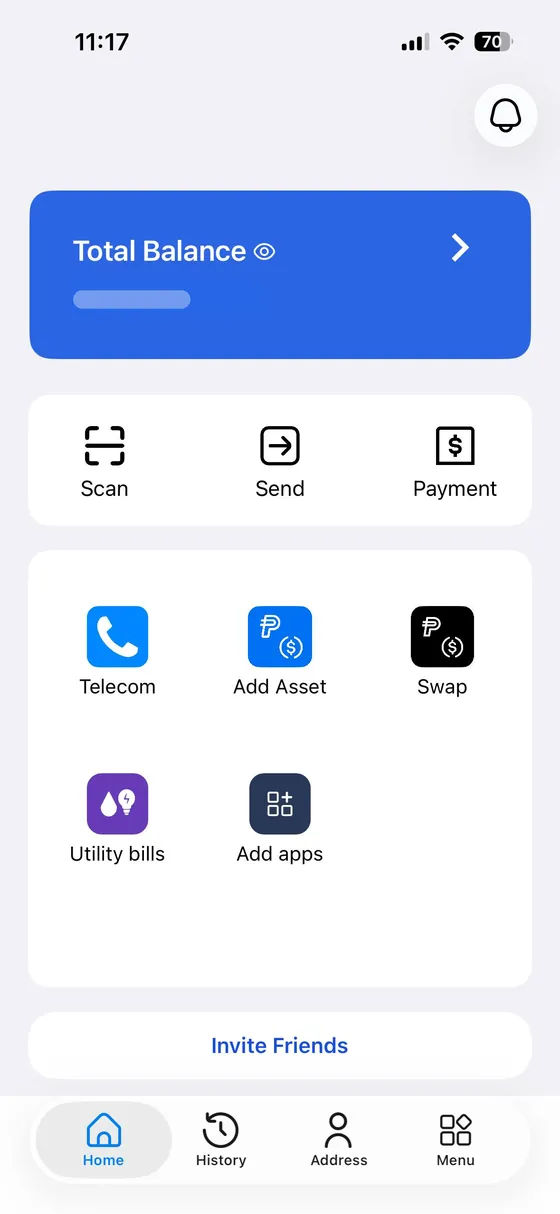
You can contact SmilePay customer support through the app. Go to the main menu, select 'Help', then 'Customer Support', and choose 'Contact Customer Support'.
What information should I provide when contacting support?
Please provide your transaction ID, the recipient's phone number, the telecom operator, the package or amount, the date and time of the transaction, and a short description of the issue.
When will customer support respond?
SmilePay aims to respond as quickly as possible. Response times may vary depending on the issue, transaction status and whether telecom providers, payment partners or blockchain networks need to be reviewed.
Can customer support reverse a completed telecom payment?
In most cases, completed airtime, data, voice or SMS payments cannot be reversed. Customer support can review the issue, but reversals depend on the status of the transaction and the policies of telecom providers and payment partners.
Home is a few taps away.
Download SmilePay and send your first telecom bundle today.